
🇪🇸 ¿Quieres leer la review en español? Haz clic aquí →
Proton Pass Review: The Password Manager That Puts Your Identity First
Quick Summary
- Type: Password and Identity Manager
- Security: Zero-knowledge architecture + end-to-end encryption
- Jurisdiction: Switzerland
- Email Aliases: Yes (built-in)
- Free Plan: Yes
- Platforms: Browser, mobile, and desktop
- Key Feature: Identity protection through email aliases
This Proton Pass review explores how it protects your identity and secures your credentials.
Overall Rating
Rating: ⭐⭐⭐⭐⭐ 4.6/5
Based on security, privacy, ease of use, and identity protection.
Introduction
The real problem is no longer your passwords — it’s your identity.
For years, we’ve treated passwords as the main lock protecting our digital lives. But there’s an even more sensitive element: the email address you use to sign up for every service. Unlike passwords, websites must store and use your email in plain text to communicate with you. When a data breach occurs, that information is often exposed, creating a permanent link between your identity and dozens of platforms. This leads to spam, targeted phishing, and behavioral tracking.
In this context, this Proton Pass review focuses on a key idea: protecting access is not enough — you also need to protect your identity.
Throughout this Proton Pass review, we’ll examine whether it truly delivers on its promises in terms of privacy and security.
What is Proton Pass?
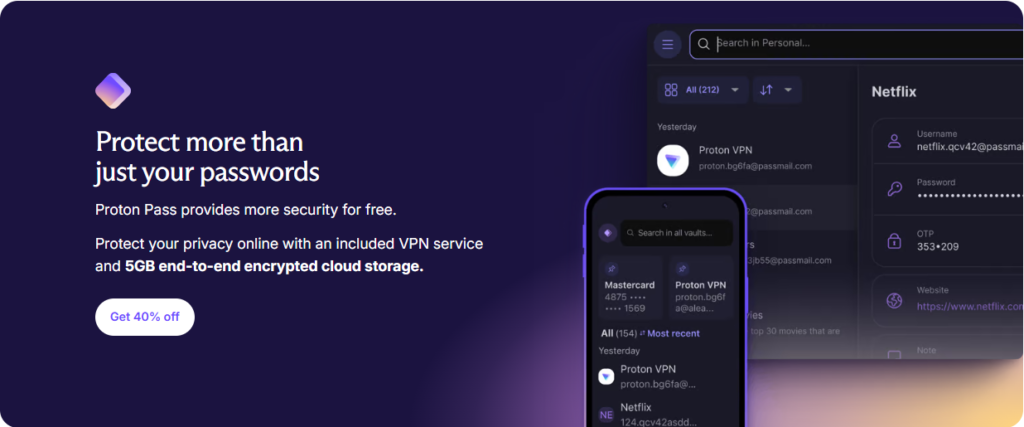
Proton Pass is a privacy-focused password and identity manager. Its goal is not just to store passwords, but to minimize the digital footprint you leave every time you sign up for or log in to an online service.
It is available on:
- Browser extensions for all major browsers (including Safari)
- Mobile apps for iOS/iPadOS and Android
- Desktop applications for Windows, macOS, and Linux
- Web app
Proton Pass stands out as one of the most secure alternatives to traditional password managers. It combines a seamless user experience with end-to-end encryption and features designed to protect your real email address.
Key Features of Proton Pass
- Reliable autofill: Fast and accurate logins across websites and apps, with smart form detection.
- Credential generator: Create strong, unique, and random passwords or passphrases tailored to each site’s requirements.
- Built-in email aliases: Generate alternative email addresses when signing up for services. If a platform suffers a breach or starts sending unwanted marketing, you can simply disable the alias.
- Secure notes and sensitive data: Safely store recovery keys, licenses, and any private information.
- Payment cards: Store card details for faster checkouts without exposing your data.
- 2FA and passkeys: Includes a built-in TOTP authenticator and passkey support to reduce reliance on traditional passwords.
- Seamless migration: Import data from browsers or other managers (e.g., LastPass, 1Password) using standard files, with a guided tool that saves time.
- Multiple vaults and sharing: Organize your credentials by context (work, personal, projects) and securely share access when needed.
Identity protection with email aliases
One of Proton Pass’s standout features is its identity protection layer. Email aliases act as a shield between your real email address and external services:
- Privacy by design: The service you sign up for never sees your real email address.
- Contained damage: In the event of a data breach, only the alias is exposed.
- Full control: If an alias starts receiving spam, you can disable it with a single click without affecting your main email.
- Universal compatibility: You can use aliases even if your primary email is not from Proton; they work with any provider.
Security and privacy
No Proton Pass review would be complete without addressing the most important question: how well it protects your data.
- End-to-end encryption and zero-knowledge: All data is encrypted and decrypted on your device; servers only store already encrypted information.
- Metadata protection: It goes beyond passwords by also encrypting sensitive fields such as usernames and URLs, reducing the risk of behavioral tracking.
- Modern architecture: Strong key derivation, authentication that never exposes your password to the server, and a vault-based key hierarchy to isolate and sign data.
- Open source and audits: The software is open source and has been reviewed by independent security firms. This transparency reduces risk and enables external verification.
- Swiss jurisdiction: Provides a stronger legal framework for privacy protection.
| Característica | Proton Pass |
|---|---|
| Tipo de servicio | Gestor de contraseñas e identidad |
| Enfoque | Protección de identidad + gestión de credenciales |
| Cifrado | Extremo a extremo (E2EE) |
| Modelo de seguridad | Zero-knowledge |
| Metadatos | Cifrados (usuario, URLs, etc.) |
| Alias de correo | Sí, integrados (SimpleLogin) |
| Autocompletado | Sí, inteligente en webs y apps |
| Generador | Contraseñas y passphrases seguras |
| 2FA / Passkeys | Sí, TOTP integrado + soporte passkeys |
| Notas seguras | Sí |
| Tarjetas de pago | Sí (solo en planes premium) |
| Plataformas | Web, navegador, móvil y escritorio |
| Migración | Sí, desde otros gestores |
| Bóvedas múltiples | Sí (limitadas en free) |
| Compartición | Sí, con control de permisos |
| Código abierto | Sí |
| Auditorías | Sí, externas |
| Jurisdicción | Suiza |
| Plan gratuito | Sí |
| Precio inicial | Desde ~$3.99/mes |
| Ideal para | Usuarios centrados en privacidad e identidad digital |
Collaboration and Proton Docs
- Important note: Proton Pass does not include Proton Docs or collaborative document editing. Its scope is limited to password and identity management.
- Collaboration in Proton Pass: Collaboration is enabled through secure sharing of items and vaults, with granular permissions and instant revocation. This provides a practical way to work as a team without exposing passwords in chats or spreadsheets.
Proton Pass Pricing and Plans
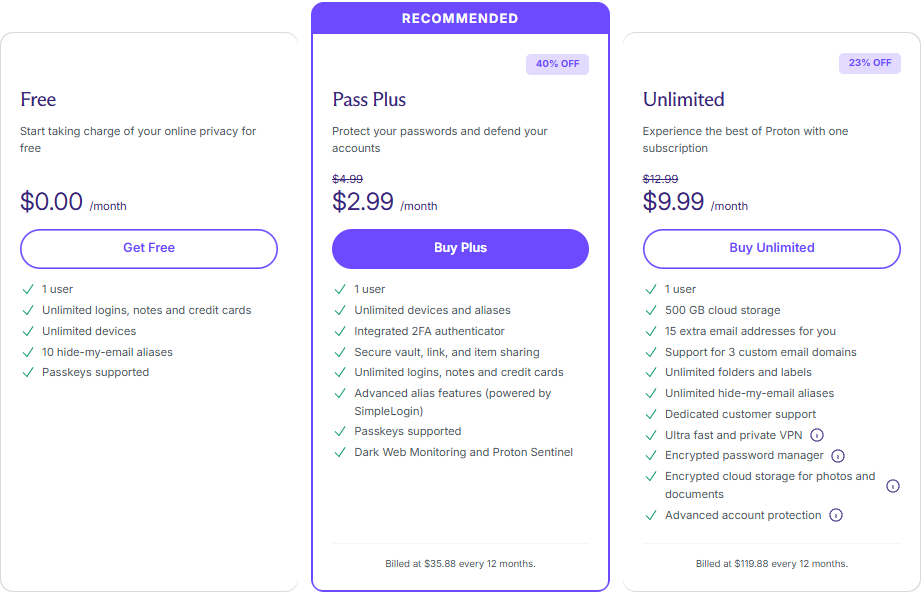
- Free: Ideal for getting started. Includes unlimited devices, passwords, and notes, limited email aliases, and a built-in authenticator with some restrictions.
- Pass Plus: Unlocks unlimited email aliases, unrestricted 2FA, multiple vaults, payment cards, and advanced features. Reference price: $3.99/month. Occasional discounts may be available for annual subscriptions, especially for early adopters.
- Duo, Family, and Business: Designed for shared use and centralized management. They include enhanced collaboration and control features. Check the official website for current pricing and availability in your region.
Note: Pricing and feature limits may change over time or vary depending on your local currency. Please refer to Proton’s official website for the most up-to-date information.
Pros and Cons
Pros
- Strong identity protection: Built-in email aliases significantly reduce spam, targeted phishing, and the link between your identity and the services you use.
- Comprehensive encryption: Protects not only passwords but also metadata such as URLs and usernames — an area many password managers overlook.
- Polished user experience: Reliable autofill, a powerful password generator, and seamless migration even if you’re switching from another manager.
- Technical transparency: Open-source code and independent audits that build trust.
- Unlimited devices on the free plan.
Cons
- Advanced features behind a paywall: Unlimited aliases, additional vaults, and advanced organization options require the Pass Plus plan.
- Attachments and storage limits: If you plan to store many files alongside your entries, the free plan may feel restrictive.
Who should use Proton Pass?
- Privacy-focused users: People who understand that their email is their identity and want to stop exposing it.
- Families and couples: Shared vaults reduce friction and eliminate unsafe practices like sending passwords through messaging apps.
- Professionals and teams: Organize access by projects and roles, with secure sharing and centralized control options.
What is a password manager?
A password manager is computer software or an app on your device where you can securely store your logins and passwords, making it faster and easier to use the internet. Using a password manager means you don’t have to remember multiple passwords or keep them written down anywhere. It protects your information by encrypting it so that no one else can access it, and helps you create unique passwords to protect yourself online.
Is Proton Pass secure?
Proton Pass protects your passwords with proven end-to-end encryption technology, so your data isn’t available to anyone but you. Everything you save, including your usernames, web addresses, and passwords are protected.
Does Proton Pass work on my iPhone or Android phone?
Proton Pass is available on iOS and Android. It’s also available on Windows, macOS, Linux, a web app, and extensions for all major browsers.
How does Proton Pass improve business security?
Proton Pass increases the account security for your entire organization by making it easier for your employees to create and remember strong, unique passwords and use 2FA on all their accounts. It also encrypts your passwords and other sensitive information using end-to-end encryption, keeping them secure even in the event of a data breach.
Additionally, admins have more control with a password manager, including the ability to manage and monitor users, giving them visibility into the/ organization’s security.
How does Proton Pass improve your team’s productivity?
Proton Pass simplifies account security for your team by streaming secure password creation and 2FA implementation. It makes it very simple for your team to follow the standard IT security protocols, allowing them to focus on what they do best. Proton Pass is quick, easy to use, and provides advanced protection. It is the single tool solution for your business’s passwords.
Conclusion of this Proton Pass Review
After analyzing Proton Pass in depth, it’s clear that its privacy-first approach sets it apart from the competition. Proton Pass is not just another password manager — it’s a complete strategy to reduce your digital identity footprint.
In this Proton Pass review, we’ve seen how its combination of email aliases, full-field encryption, and a polished user experience places it ahead of alternatives that only store passwords. If you want to reduce your exposure to data breaches and regain control over who can contact you and how, try the free plan and evaluate whether the advanced features of Pass Plus fit your needs.
Protecting passwords is important — protecting your identity is essential.
This Proton Pass review confirms that it’s a strong choice for users who prioritize privacy and security.
If you’re also interested in protecting your connection, you can check out our guide to secure VPNs here. To further enhance your privacy, you can combine it with Proton Mail, the encrypted email service we reviewed. And to securely store your files, you can rely on Proton Drive as your private cloud solution.
You can use SiteGround to host your website for its speed and security.
This article contains affiliate links. We may earn a commission at no additional cost to you.
Fuentes: https://proton.me/pass